Never miss what matters.
Meetings, flights, shifts, deadlines — MeetAlarm turns what's on your calendar (and what isn't) into real alarms that cut through Silent and Focus, ring on time, and join meetings in one tap.
Requires iOS 26 or later · No server. No account. No tracking.
Calendar notifications are too weak.
A banner flashes by, and Silent or Focus mode silences it entirely. Missing a meeting is costly — and a quiet reminder is no reminder at all.
A calendar notification
- A banner that flashes by and is gone
- Silenced by Silent and Focus mode
- You still have to dig through the invite for the link
- No idea when to leave for an in-person meeting
A MeetAlarm alarm
- A real system alarm — it must ring
- Cuts through Silent and Focus
- Full-screen, with a Lock Screen & Dynamic Island countdown
- One tap to join the call or get directions
Whatever you can't be late for.
Turn off “Meetings only” and every timed event on your calendar rings as a real alarm — on the free plan.
Back-to-back meetings
Rings a few minutes ahead, then one tap into the call.
Medical appointments
Booked weeks ago — arriving late means rebooking.
Flights & trains
A missed departure can't be apologized away.
Interviews
The one event “my phone was on silent” can't excuse.
School pickups
Someone is standing there, waiting for you.
Shifts & on-call duty
Rosters rotate — alarms that follow the calendar don't slip.
Deadlines & due dates
Filings, renewals, payments — ring while there's time to act.
Visa & bank appointments
These windows don't offer second chances.
The whole product, on one screen at a time.
Real screenshots — this is exactly what MeetAlarm looks like on your iPhone.
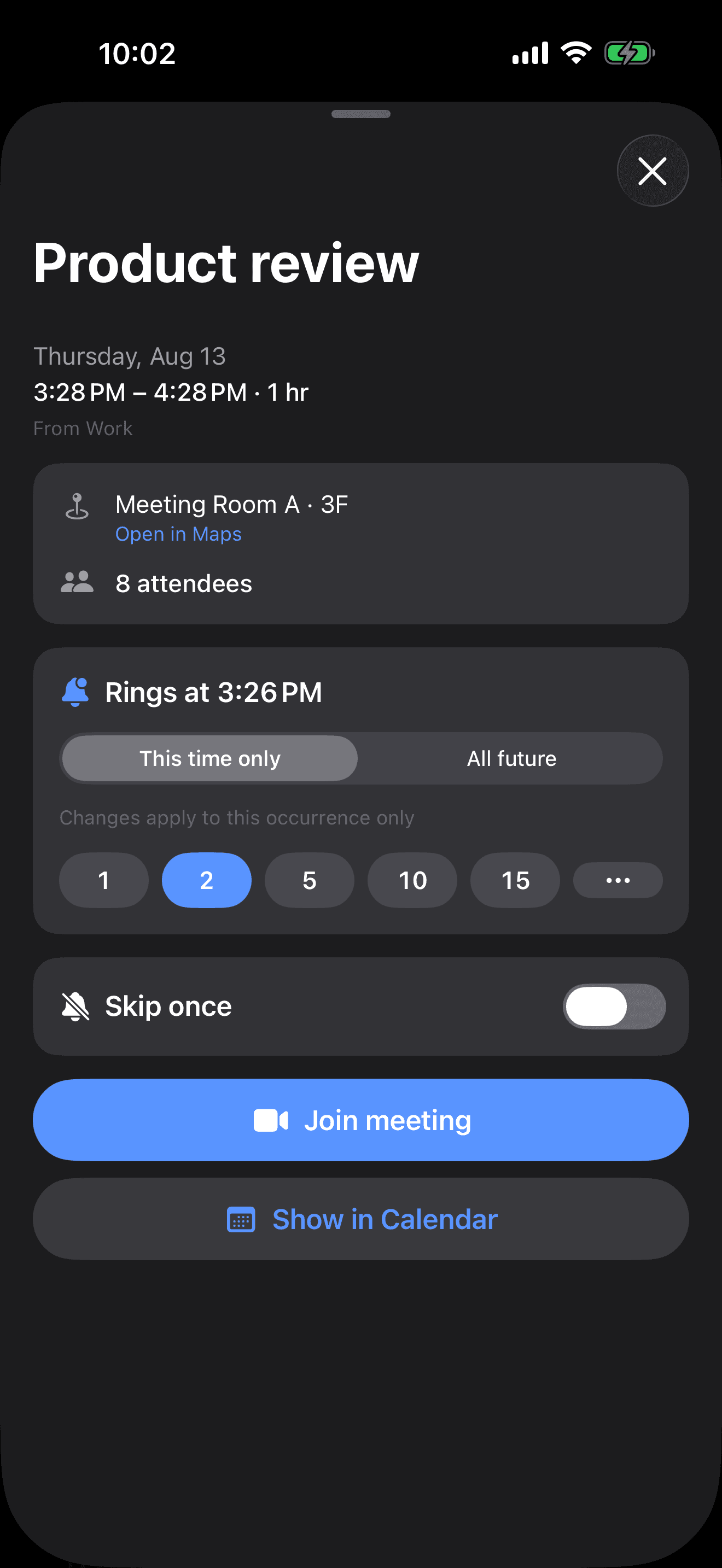
One tap from alarm to meeting
Every meeting shows when it rings and lets you tune the lead time. When it goes off, a single button drops you into Zoom, Meet, Teams and more — or dials a phone conference for you.
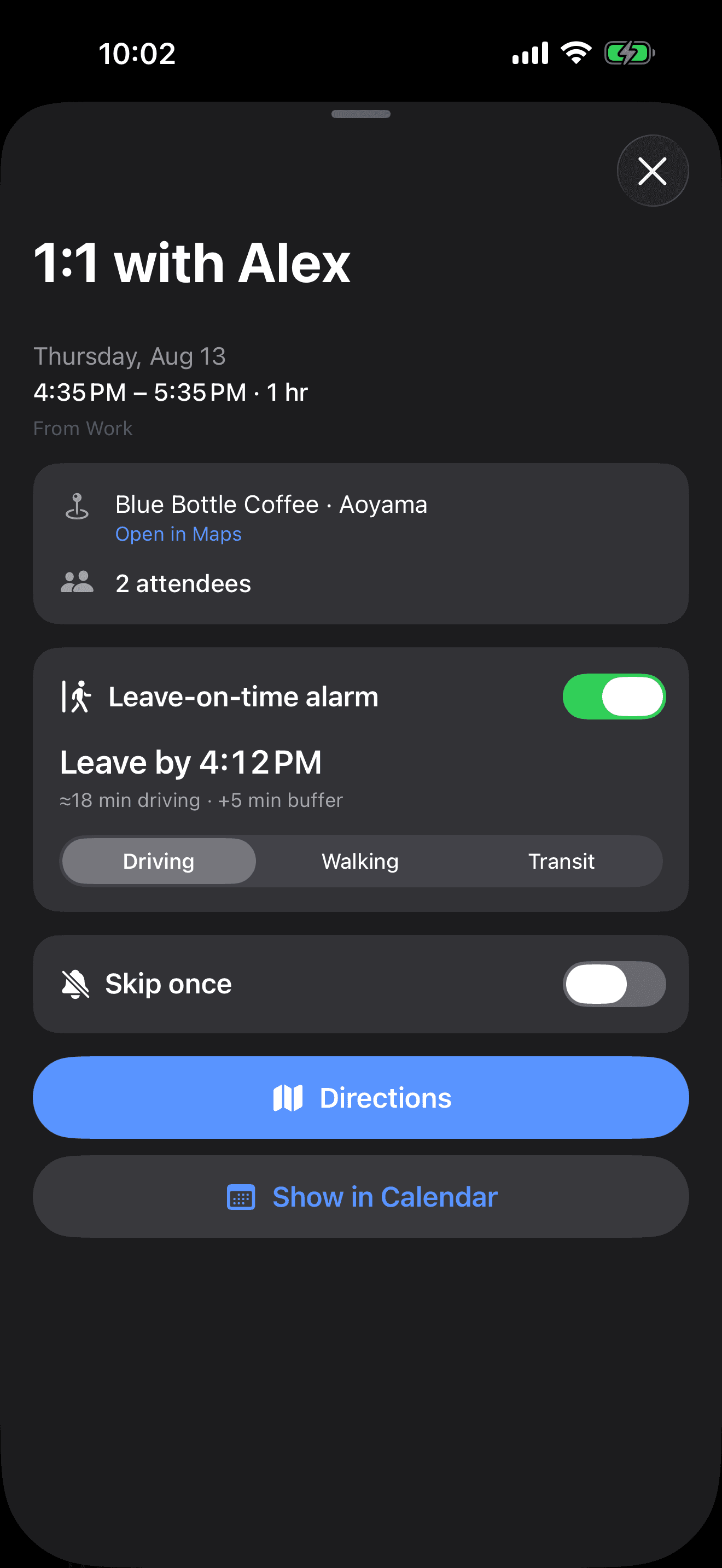
“Leave by” for in-person meetings
For meetings with a place instead of a link, MeetAlarm works out when to leave from live travel time and a buffer — then gives you one-tap directions.
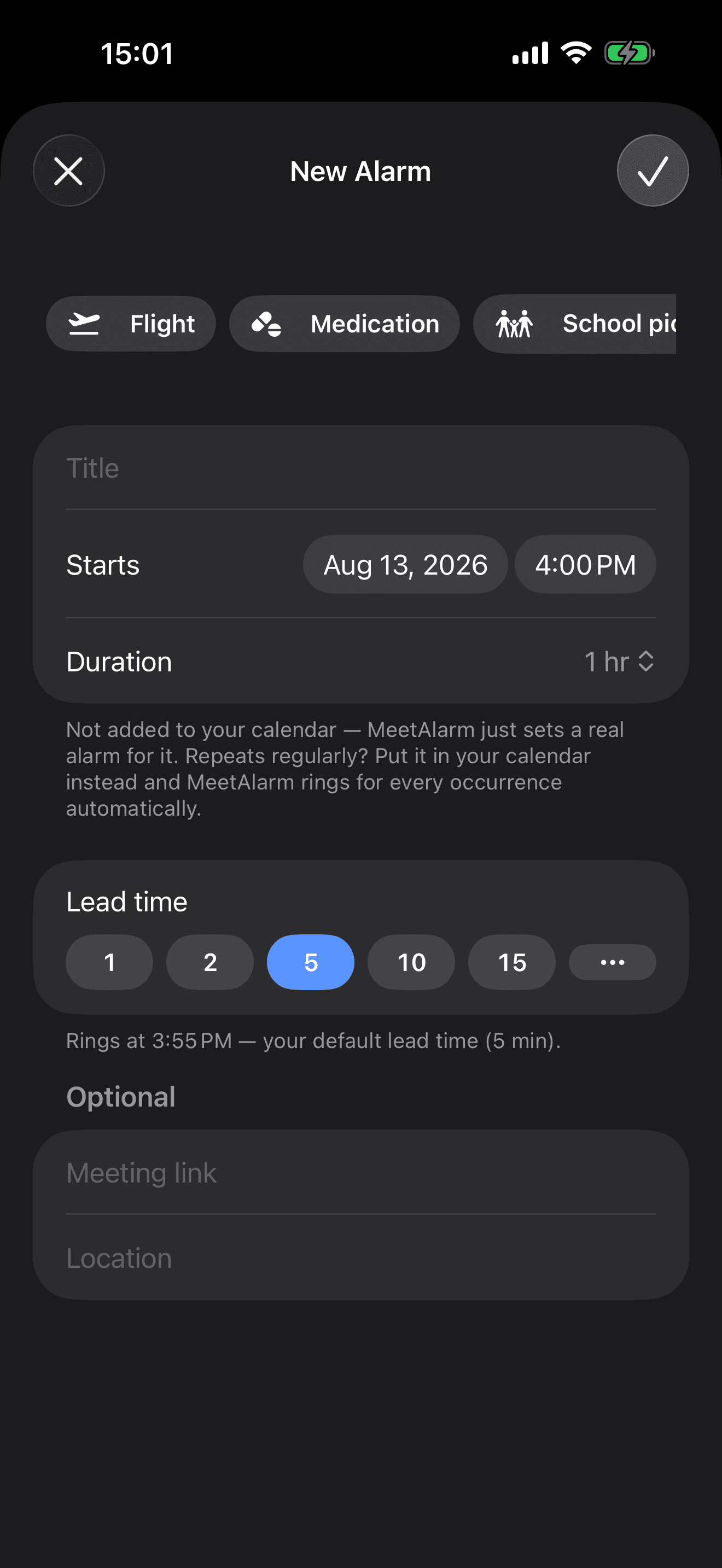
Not on your calendar? Still rings
One-off moments that never made it to your calendar ring exactly the same — and presets for flights, medications, pickups, shifts and deadlines prefill the form in one tap. Paste a link for one-tap join, add a place for leave-on-time.
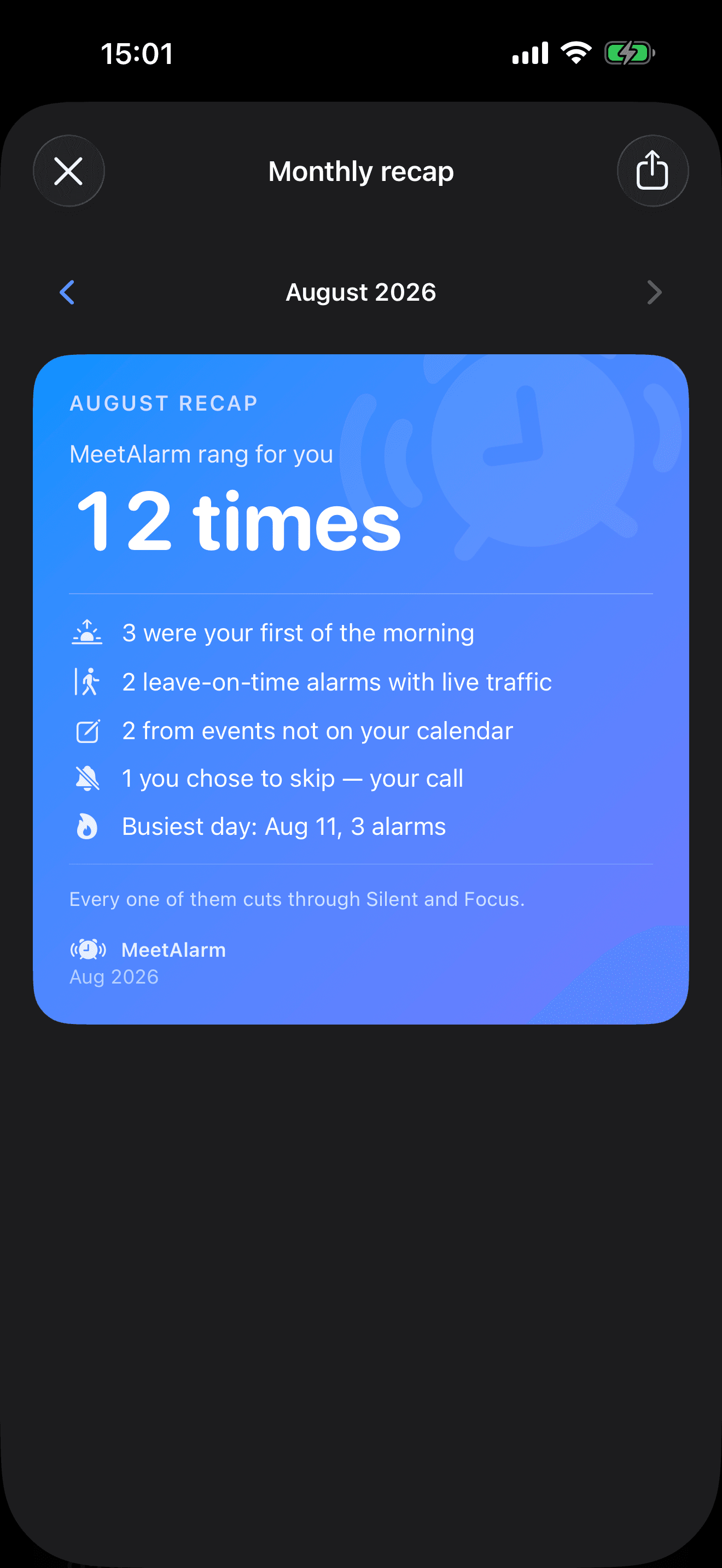
Every ring, remembered
Once a month, MeetAlarm turns every alarm that rang for you into a shareable recap card — first rings of the morning, leave-on-time saves, events that never made the calendar. Free, built on-device.
Everything that keeps you on time.
MeetAlarm does one thing — kill the risk of missing or being late to a meeting — and does it well.
Real alarms that cut through Silent & Focus
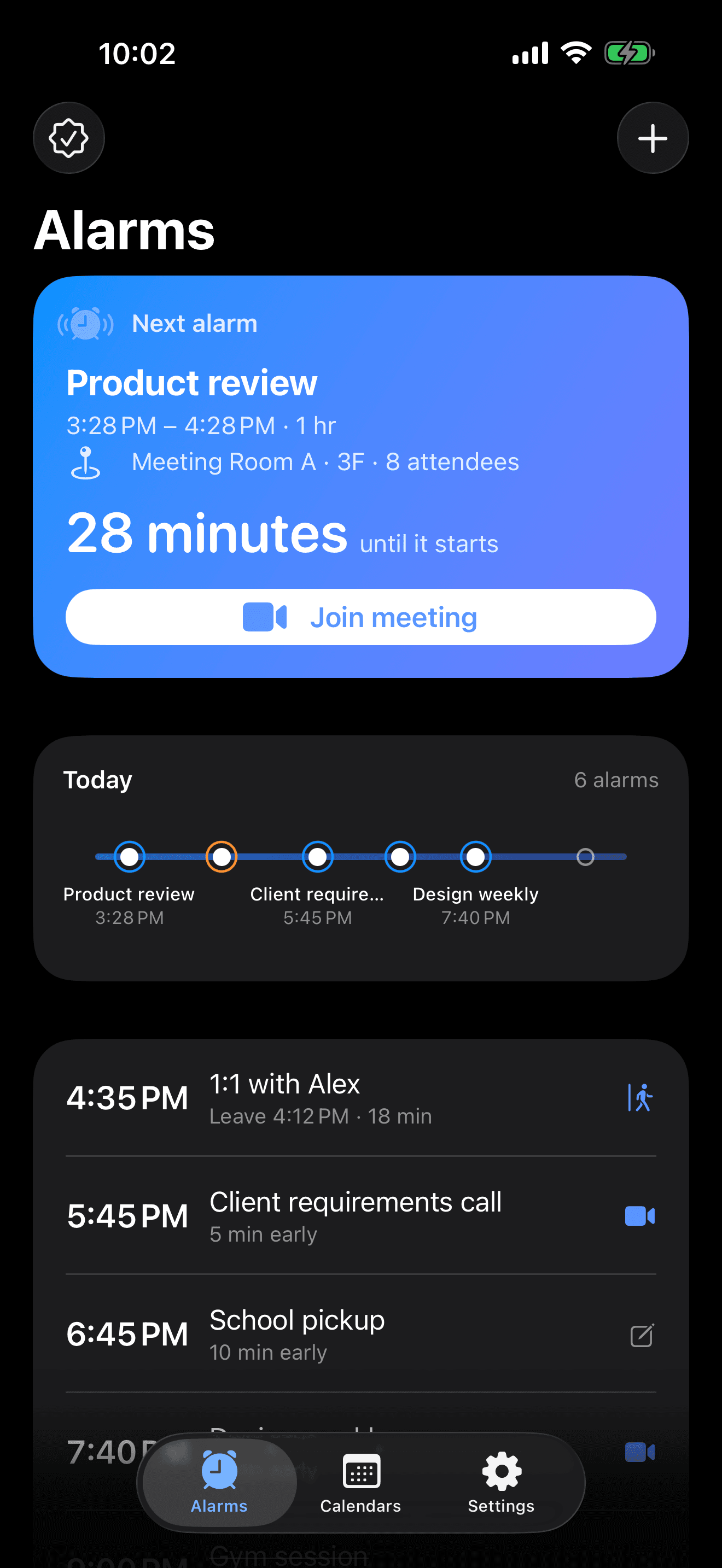
Not a banner notification — a real iOS 26 system alarm (AlarmKit). It must ring, full-screen, visible on the Lock Screen. This is the foundation.
Join in one tap
When it rings, jump straight into the call. Zoom, Google Meet, Microsoft Teams, Webex, Tencent Meeting / VooV, Lark / Feishu, DingTalk and FaceTime are all recognized — phone conferences auto-dial and enter the code (DTMF).
Not on your calendar? Add it by hand
Manual events give one-off moments a real alarm too. Tap + in the top-right corner and one-tap presets — flight, shift, medication, pickup, deadline — prefill the form; or start blank with a title and a time. Done in seconds. Free keeps 2 at a time.
Leave-on-time alarms
For in-person meetings, MeetAlarm reminds you when to leave — start time minus live travel time minus a buffer — instead of a flat “N minutes before.” Estimated with real-time traffic.
Live Activity & Dynamic Island
Your next meeting lives on the Lock Screen and Dynamic Island with a glanceable countdown — and you can join right from there.
Two-stage alarms
Schedule two alarms for one meeting: an early soft “get ready” nudge plus a hard alarm right before it starts.
Home Screen widget
Small, medium and large sizes show your upcoming meetings — tap a row to join.
Siri & Shortcuts
Say “Add an event in MeetAlarm” and Siri sets a real alarm in seconds — no typing. Ask “When is my next meeting alarm?” or “Skip my next meeting” and MeetAlarm answers and acts.
Monthly recap
A shareable card of everything your alarms caught this month — first rings of the morning, leave-on-time saves, manual events, your busiest day. Save it to Photos or share it. Free.
Dual time zone
Cross-time-zone meetings show both the other side’s time and yours so you never misread — the alarm itself fires on the absolute moment, so it’s never wrong.
Custom alarm sound
Pick a sound that gets your attention.
Private by design — fully on-device
MeetAlarm only reads your calendar to schedule alarms. No server, no account, no analytics, no tracking. Your meeting data never leaves your phone.
Recognizes your meeting links automatically
 Zoom
Zoom Google Meet
 Microsoft Teams
 Webex
Webex Tencent Meeting / VooV
 Lark / Feishu
 DingTalk
 FaceTime
 Phone dial-in
Three steps. Then forget about it.
Connect your calendar
Grant read-only calendar access (EventKit) and choose which calendars should ring.
Alarms schedule themselves
MeetAlarm turns the next 7 days of events into system alarms, following your rules. The Calendars tab shows how many alarms each calendar produced — and what your rules filtered out. Change your calendar and the widget nudges you to open the app and sync; “Alarms set through …” always tells you how far ahead you're covered.
Ring on time, join in one tap
When it rings it cuts through Silent — one tap to join the call, get directions, or dial in.
Private by design.
MeetAlarm is built the way a tool that reads your calendar should be: there is nothing to leak because nothing leaves your device.
This website follows the same principle: no third-party trackers, no cookies, no ad scripts.
Read the full Privacy PolicyNo server, no account
MeetAlarm reads your calendar on-device to schedule alarms. There is no server, no sign-up, no analytics and no tracking. Your meeting data is never uploaded.
Networking is minimal and goes only to Apple
The only network use is App Store purchases (handled by Apple), in-app map previews, place autocomplete when you type a location, and travel-time estimates — all via Apple Maps, with your location used only while the app is open. MeetAlarm has no servers of its own.
Everything stays on your device
Your calendar selection, alarm rules and diagnostic logs live only on your device. Delete the app and all of it is gone.
Free for the essentials. Pro for the rest.
Free users get alarms that ring, one-tap join, one calendar and their own default lead time. Pro unlocks scale and fine-grained control — not the core.
Free
The real alarm, free forever
Pro
Scale & fine-grained control
Monthly
Try it month to month
Yearly
Best value
Lifetime
Pay once, keep forever
Prices vary by region — see exact pricing inside the app on the App Store. Monthly, yearly and a one-time Lifetime option are available; yearly is the best value.
Questions, answered.
Will it cut through Silent and Focus mode?+
Yes. MeetAlarm uses iOS 26 system alarms (AlarmKit), so it rings just like the system Clock alarm.
Do I need an account? Will my calendar be uploaded?+
No account needed, and your calendar is never uploaded. Everything runs on-device.
Which meeting platforms are supported?+
Zoom, Google Meet, Teams, Webex, Tencent Meeting / VooV, Lark / Feishu, DingTalk, FaceTime, and plain phone dial-in.
Which iOS versions are supported?+
iOS 26.0 and later. MeetAlarm relies on AlarmKit, which is iOS 26+ only. It is iPhone-only — there is no Android version.
Can I use it for free?+
Yes. Real alarms that cut through Silent, one-tap join, one calendar, your choice of meetings-only or every timed event, and an adjustable default lead time are all free.
Can it ring for events that aren't meetings?+
Yes. Turn off “Meetings only” in your calendar's rules and every timed event rings — appointments, interviews, flights, pickups. All-day events are skipped by default. And if something never made it to your calendar at all, tap + and add it as a manual event. Both work on the free plan.
Do I need to open the app for alarms to stay in sync?+
Occasionally, yes — iOS limits background work, so MeetAlarm re-syncs with your calendar when you open it (and opportunistically in the background). You never have to guess: the Home Screen widget nudges you when your calendar changed and a sync is due, and the bottom of the timeline always shows “Alarms set through <date>”.
How is “leave on time” calculated?+
It uses your location and Apple Maps to estimate live travel time (only while the app is open), then subtracts travel time and a buffer from the start time. This is a Pro feature.
Is my data safe?+
There is no server and no analytics. Delete the app and everything is cleared.